
SkyportHome
Daikin Comfort Technologies North America, Inc.House & Home
4.5664.00 Reviews
- Version
- 3.8.1
- Installs
- 100.00K
- Age Rating
- Everyone
Screenshots
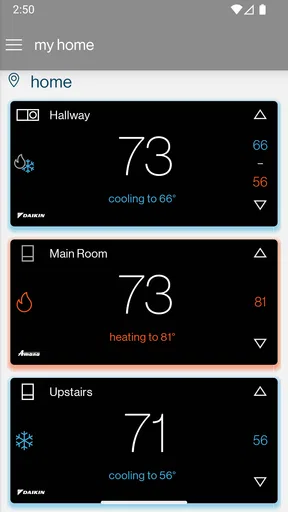
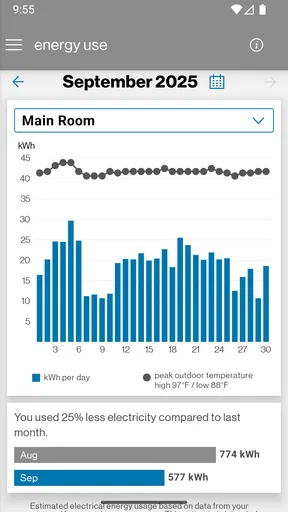
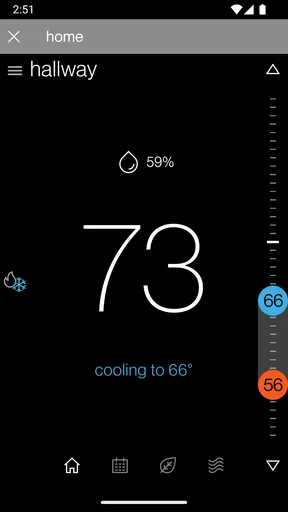
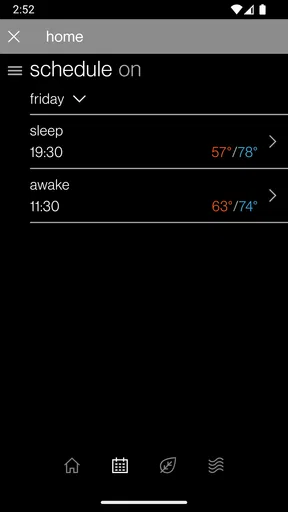
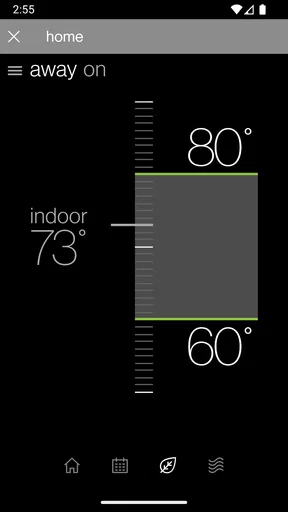
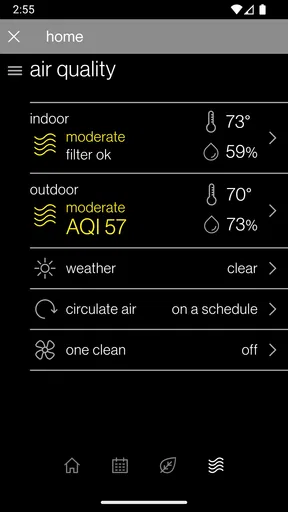
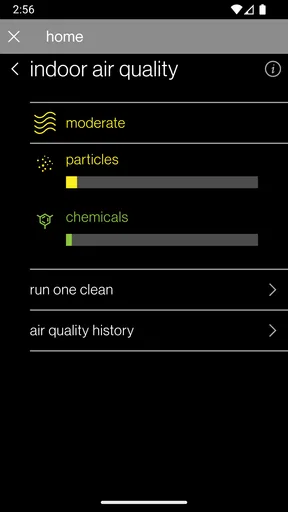
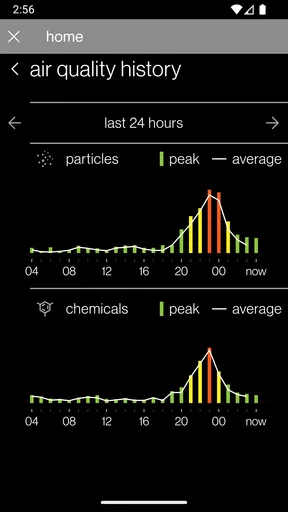
Our Review of SkyportHome
 Analysis by Appyee
I found SkyportHome most useful as a quiet, practical way to manage compatible home heating and cooling equipment without being tied to the wall thermostat. It is not trying to replace a full smart-home platform, and that is actually part of its appeal. The app focuses on a specific job: giving owners of compatible Daikin, Amana, and Goodman systems a remote control point for everyday comfort.
That focus makes the experience easier to understand than many broader home-automation apps. I can open it when I want to check the indoor setting, make an adjustment before arriving home, or avoid walking to another room just to change the temperature. At the same time, the app’s usefulness depends heavily on owning a supported system. If your equipment is from another manufacturer, or if you want one application to control every connected device in your home, this is probably not the right place to start.
What using SkyportHome feels like in daily life
SkyportHome is a free House & Home app from Daikin Comfort Technologies North America, Inc. It has been available since April 12, 2019, and the current version is 3.7. The basic idea is straightforward: connect the app to an eligible heating and cooling setup, then use a phone or tablet as a convenient control surface when you are away from the physical thermostat.
I like that the purpose is immediately clear. A thermostat app should not make me search through unrelated tools before I can make a simple adjustment. SkyportHome is built around the comfort system itself, so it makes the most sense for someone who already has compatible equipment installed and wants a remote layer on top of it.
A realistic example is a house that sits empty during the day. Before leaving, I might keep the system at a more economical setting rather than conditioning an empty space. On the way home, I can use the app to prepare the indoor environment instead of waiting until I walk through the door. That is a small convenience, but it is the kind of repeated convenience that makes a connected thermostat worthwhile.
The same workflow can help when plans change. If I leave earlier than expected, I can avoid forgetting that the system is still running normally. If I stay away longer, I can make a remote adjustment rather than asking someone to enter the home. The value is less about dramatic automation and more about reducing the number of small thermostat decisions I would otherwise postpone.
The app is rated 4.6 on average from around 6,000 ratings, with roughly 625 written reviews. It has passed 100,000 installs, which gives it a reasonably established presence among owners looking for this particular type of control. Those figures do not make it automatically perfect, but they do suggest that the core experience is serving a substantial group of users.
The strongest reason to choose it
The clearest strength is the direct relationship between the application and the supported HVAC equipment. Instead of buying a separate universal controller and hoping it handles every part of a specialized system correctly, owners can use the platform associated with the equipment family. That can be reassuring when the heating and cooling setup has functions that a generic controller may not represent cleanly.
This matters especially for people who do not want to turn temperature management into a hobby. A broad smart-home platform can be powerful, but it often brings extra accounts, device categories, routines, and integrations. SkyportHome is more focused. I would rather use a narrower tool that matches my equipment than navigate a large dashboard just to make one temperature change.
Another useful distinction is remote access. A traditional wall thermostat works well when I am physically at home, but it cannot help much when I am already away. The mobile app extends that control to situations where the physical interface is inconvenient. That can be helpful for second homes, guest spaces, households with changing schedules, or anyone who frequently remembers a thermostat task only after leaving.
It also offers a more comfortable handoff between routine control and occasional intervention. I can think of the wall thermostat as the permanent household control and the app as the flexible companion. That is a better mental model than treating the phone as the only way to manage the system. If the phone is unavailable, the home should still have its normal physical control; if I am away, the app fills the gap.
Where the focused design helps
In my experience, a dedicated HVAC app is most valuable when the household has a clear pattern. For example, someone who works outside the home may want one setting during working hours and another before returning. A family with irregular schedules may appreciate being able to adjust the environment without coordinating around whoever is standing near the thermostat.
There is also a useful distinction between comfort control and whole-home automation. SkyportHome is better suited to the former. I would choose it when the main question is, “Can I manage my compatible heating and cooling system from my phone?” I would look elsewhere when the main question is, “Can I combine climate control with lighting, locks, sensors, voice assistants, and elaborate routines in one place?”
That trade-off keeps the app approachable. The fewer unrelated controls it presents, the less likely I am to confuse a climate adjustment with a broader automation rule. For a homeowner who wants a dedicated tool rather than a smart-home command center, this is a meaningful advantage.
Practical habits that make it more useful
I would set up the app while standing near the equipment and keep the first session deliberately simple. Confirming that the system responds to a basic adjustment before relying on remote control is a sensible step. It is better to discover a connection or compatibility issue at home than when arriving late on a cold or hot day.
I would also avoid using remote control as a substitute for understanding the physical thermostat. The app is a convenience layer, not a reason to ignore the equipment’s normal controls. If another person in the household changes settings locally, the phone view may no longer reflect the plan I had in mind. A quick check before making a second adjustment can prevent unnecessary back-and-forth.
For a second property, I would treat the app as one part of a check-in routine rather than the entire safety plan. Remote temperature control can help maintain comfort, but it should not be confused with a complete monitoring service. If the property is vacant for long periods, I would still want a separate way to confirm that the home and equipment are operating as expected.
One less obvious benefit is that the app can reduce unnecessary trips to the thermostat in a large or awkwardly arranged home. That sounds minor, but it becomes noticeable when the thermostat is upstairs, in a hallway, or in a room that is not convenient to reach. The phone is already with me, so the adjustment becomes a quick action instead of a chore I keep delaying.
The main limitation: compatibility comes first
The biggest weakness is also the most important condition of use: SkyportHome is only a sensible choice if it matches the installed equipment. The store summary specifically centers on Daikin, Amana, and Goodman heating and cooling systems. I would not download it expecting a universal thermostat solution for an unrelated brand.
That limitation affects the buying decision before the app is even installed. A person renting an apartment, moving into a home with an unknown system, or replacing equipment soon may be better served by an option designed around broader compatibility. In those cases, the app’s focused design becomes a constraint rather than a strength.
Even for an owner of one of the named brands, the exact equipment and connected setup still matter. I would check the system documentation and installation details before planning a remote-control routine. A brand name alone is not a guarantee that every model, accessory, or household arrangement behaves identically.
There is another practical limitation: an app cannot repair an unsuitable installation or solve every network problem. If the equipment is not properly connected, if the home network is unreliable, or if the system itself needs service, a phone interface will not remove that underlying issue. This is important because remote control can create a false sense that everything is being watched continuously. I see SkyportHome as a control tool, not a replacement for maintenance or an on-site check.
The app also may feel narrow to users who expect a modern smart-home hub. Someone who wants extensive cross-device routines could find the experience too specialized. I would rather use a broader platform in a home where climate control is only one part of a carefully coordinated setup. SkyportHome makes more sense when HVAC control is the priority and other devices can remain in their own applications.
Who should use it and who should skip it
I would recommend SkyportHome to homeowners with compatible Daikin, Amana, or Goodman equipment who want convenient remote access without building an elaborate connected-home system. It is especially suitable for people with changing schedules, second properties, large homes, or a simple desire to adjust comfort before they arrive.
It is also a reasonable fit for households that prefer a dedicated manufacturer-linked tool. Some people do not want to combine every device under one account or learn a complex automation interface. For them, a focused HVAC app can be easier to explain to other family members and easier to use for the one task that matters.
I would be more cautious about recommending it to renters or anyone who cannot confirm the installed system. I would also steer away users who want a universal solution across several unrelated HVAC brands. If the household already relies on a preferred smart-home ecosystem and expects climate control to participate in detailed multi-device routines, that existing ecosystem may be the more convenient choice.
The age rating is Everyone, and the app is free to download. Those details make it easy to try without a purchase decision, but they do not remove the compatibility question. The important investment is not the app itself; it is the connected heating and cooling equipment already installed in the home.
How it compares with the usual alternatives
The simplest alternative is the physical thermostat. That remains the most dependable choice when I am at home and want immediate control without opening a phone. It does not require me to find the app, sign in, or think about connectivity. For a person who rarely changes settings and is always home when adjustments are needed, the wall control may be enough.
A generic smart thermostat offers a different proposition. It may be more attractive for someone choosing new hardware, combining several brands, or looking for a larger automation ecosystem. However, changing thermostats can involve installation decisions, equipment compatibility, and a willingness to replace a working control. SkyportHome is less disruptive for an owner whose existing compatible system already supports the platform.
Whole-home platforms are another alternative. They can provide a single place for climate, lighting, security, and other devices, but they may also add complexity. I would choose one when cross-device routines are central to my home. I would choose SkyportHome when I mainly want reliable, direct access to the HVAC system and do not need a large collection of connected controls.
This comparison reveals the app’s real position: it is not necessarily the most flexible climate product for every household, but it can be the most sensible companion for the right installed equipment. The best choice depends less on the app’s feature count than on whether its focused approach matches the way I manage my home.
Installation expectations and everyday reliability
Before installing it, I would gather the equipment information and make sure the person responsible for the HVAC system is available during setup. That preparation can save time because the app’s usefulness begins only after the system and account are properly connected. I would also test both a local adjustment and a remote adjustment, giving the system enough time to respond before assuming something has failed.
Once it is working, I would use small, deliberate changes rather than repeatedly tapping controls when a response seems slow. Heating and cooling equipment does not always react like a light switch, and the indoor temperature will not change instantly just because a setting changed on the phone. Keeping that distinction in mind makes the experience less frustrating and avoids unnecessary commands.
I would also agree with other household members on who normally changes the schedule or temperature. Remote access is convenient, but two people making opposite adjustments can make any thermostat app feel unreliable. A simple household rule—such as using the app for arrival preparation and the wall control for immediate local needs—can make the system easier to live with.
The current version is 3.7, and the app requires Android 9 or later. That makes the operating-system requirement relevant for anyone using an older phone or tablet. I would check the device before planning to use an old spare phone as a permanent household controller.
My verdict after weighing the trade-offs
SkyportHome succeeds because it does not pretend that every home needs the same kind of smart control. For compatible Daikin, Amana, and Goodman equipment, it offers a focused way to bring thermostat access into everyday routines. I appreciate the practical benefits: preparing the home before arrival, avoiding unnecessary walks to the wall control, and handling schedule changes while away.
Its limitations are equally clear. Compatibility is the deciding factor, remote access should not be mistaken for complete home monitoring, and users seeking a broad smart-home command center may outgrow its focused approach. Those are not reasons to dismiss it; they are reasons to choose it for the right situation.
My recommendation is simple: install SkyportHome if your compatible HVAC system is the center of your smart-home needs. It is free, rated for Everyone, and supported by Daikin Comfort Technologies North America, Inc., so trying it is a low-risk way to see whether remote climate control fits your routine. I would skip it only when the equipment does not match, when a physical thermostat already covers every need, or when a broader platform would better connect the rest of the home.
For the right owner, this is a useful companion rather than a flashy gadget. It turns a compatible heating and cooling system into something I can manage with less friction, while staying narrow enough to remain understandable. That balance is what makes it worth considering.
Privacy and Permissions
See what permissions an app requests and how it handles your data.
- Location
- approximate location (network-based), precise location (GPS and network-based)
- Photos/Media/Files
- read the contents of your USB storage, modify or delete the contents of your USB storage
- Storage
- read the contents of your USB storage, modify or delete the contents of your USB storage
- Camera
- take pictures and videos
- Wi-Fi connection information
- view Wi-Fi connections
- Other
- view network connections, change network connectivity, allow Wi-Fi Multicast reception, connect and disconnect from Wi-Fi, full network access, run at startup, draw over other apps, control vibration, prevent device from sleeping, Google Play license check, read Google service configuration
Verdict
Strengths of SkyportHome
- Simple way to monitor and manage compatible home devices remotely.
- Centralizes key home-control functions in one mobile interface.
- Useful for checking device status when you are away from home.
- Can make everyday routines more convenient with remote controls.
- May help users organize multiple supported devices in one account.
Limitations of SkyportHome
- Works only with SkyportHome-compatible devices and supported installations.
- Remote features depend on a stable internet connection.
- Initial device pairing may require technical setup or troubleshooting.
- Some functions may vary depending on the device model or region.
- Background connectivity can increase battery and mobile data usage.
Similar Picks in This Category
View All
Universal TV Remote Control
CodeMatics Media Solutions3.9

AlfredCamera Home Security app
Alfred Systems Inc.4.7

Planner 5D: AI Home Design
Planner 5D4.5

Universal Tv Remote-Cast to TV
One Music Player4.1

Zillow: Homes for Sale & Rent
Zillow Group4.8

99acres Buy/Rent/Sell Property
infoedge.com4.3
Frequently Asked Questions
What is SkyportHome, and what can I use it for?
SkyportHome is designed to help users manage and interact with compatible smart-home or residential services from a mobile device. Depending on the supported equipment and account setup, it may provide access to home controls, property information, notifications, or connected features. Before downloading, check the official listing to confirm that SkyportHome supports your region, device model, and the specific services you want to use.
Is SkyportHome compatible with both Android and iPhone?
SkyportHome may be available for Android and iOS, but compatibility can depend on the operating-system version, phone model, and connected hardware or service provider. During testing, the overall experience is most useful when the phone meets the developer’s minimum requirements. Users should review the Google Play or App Store listing before installation, especially if they use an older device or tablet.
Do I need an account or compatible equipment to use SkyportHome?
In most cases, an app such as SkyportHome requires users to create an account, sign in through an existing service, or receive access from a property or system administrator. Some features may also depend on compatible smart-home equipment, building services, or an active subscription. Installing the app alone may not unlock every function, so confirm the required hardware and registration details beforehand.
Does SkyportHome require an internet connection, and does it work remotely?
SkyportHome is likely to require an internet connection for sign-in, synchronization, notifications, and communication with connected services. Certain basic information may remain visible temporarily if it has already been loaded, but remote controls and live updates generally depend on both the phone and the home system being online. Performance can also vary with Wi-Fi quality, mobile data coverage, and server availability.
Is SkyportHome safe to download, and what permissions or privacy concerns should I know about?
Download SkyportHome only from the official Google Play Store or Apple App Store, and verify the developer name before installing. The app may request permissions related to notifications, Bluetooth, location, camera, or local-network access, depending on the features it supports. Review the privacy policy and permission prompts carefully, allowing only access that is necessary for the functions you intend to use.
